
Reporter is a simple app that can be set up to prompt you with custom questions at random times throughout the day. The interface is nice and convenient to use, but the analysis options are somewhat limited.
Fortunately, the app can be set up to export data, and you can now import the data into Zenobase automatically.
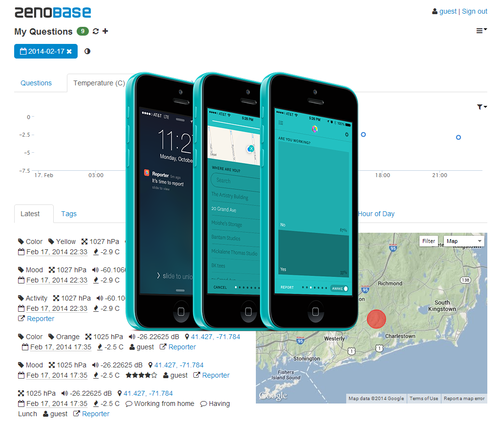
Here’s how:
- Set up Reporter to export your data in JSON format to a Dropbox folder. Reporter should create one file per day.
- Drop a text file named zenobase-conf.json into the same folder. You’ll need to set the proper timezone in this file, and list the exact prompt text for each question that you want to import. You can also set an optional tag that will be added (the prompt text itself is discarded). For numeric values, you can specify if you want them interpreted as a rating (0-10), or as a simple count (the default). Tokens can be interpreted as tags, or as notes (the default). Tip: Use JSONLint to check the syntax of the file!
- Create a new bucket in Zenobase using the Questions (Reporter) template. Set the folder name, and follow the instructions to authorize access to Dropbox.
You should now see one event in Zenobase for each response. Each event has a timestamp, a location, the average noise level (0dB is the loudest sound that the device can record, negative values are more quiet), temperature, air pressure, and of course the responses, either as a rating or as a count (numeric values), as tags (multiple choice values), or as notes (free text). Hit refresh to get new data the next day.
Now you can edit, filter and correlate your data: Is there a significant correlation between air pressure and back pain? Is my mood better when I’m in or when I’m out of town? Let us know what you find–or if you run into trouble or have suggestions!