
Zenobase now speaks MCP, the open protocol that lets an LLM client like Claude connect to external data sources. You can point Claude (or any other MCP client) at your Zenobase account and ask questions about your data in plain English, without having to deal with our obtuse dashboard interface, or exporting and importing your data elsewhere first.
How to set it up
- In Claude, add a custom connector with the URL
https://api.zenobase.com/mcp(this may require a Claude Pro/Max plan). - You’ll be prompted to sign in to Zenobase to connect Claude.
- In Zenobase, go to Settings → Access you’ve granted others. The newly registered client will appear with status Pending.
- Click the row, check the buckets you want Claude to have access to, and save.
That’s it. Claude can now read from the buckets you selected. Other MCP-compatible clients should work the same way, though the connector setup may differ.
What you can ask
The server exposes read-only tools that mirror the kinds of queries Zenobase already supports — listing buckets, fetching raw events, time series, histograms, top values, and summary statistics. The LLM will figure out the right tools and queries to answer your questions.
- “How much vitamin D am I currently taking?”
- “Have I seen Zootopia?”
- “Do more bakery visits increase my body weight?”
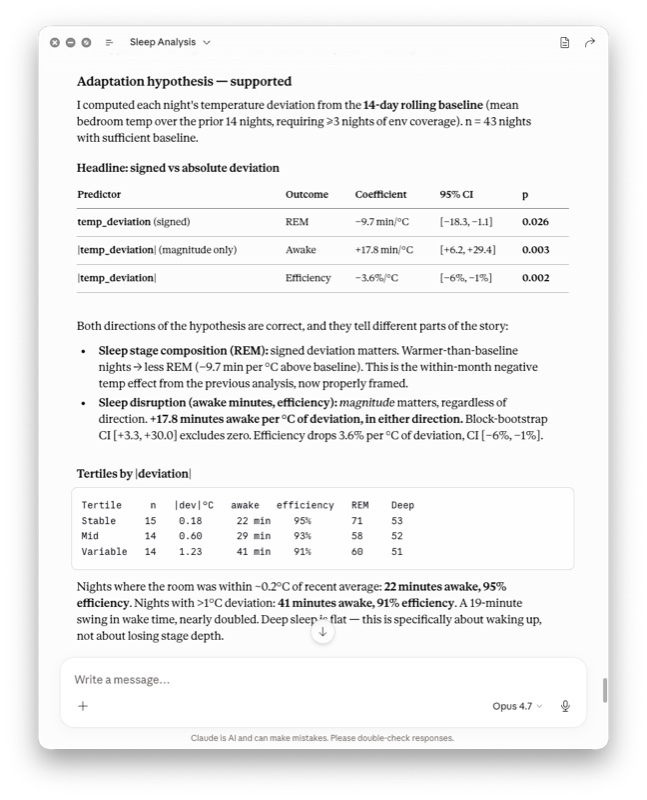
Since Claude can also read data from Apple Health and Google Health Connect, you can have it analyze data across multiple sources. For example, I had a hypothesis about my sleep that required combining data from Health Connect (sleep) with data stored in Zenobase (room temperature):
What’s next
Once we have learned to trust our LLMs, we might let them write to Zenobase (“I just drank a cup of coffee”)…
Meanwhile, please let us know whether and how any of this works for you!