
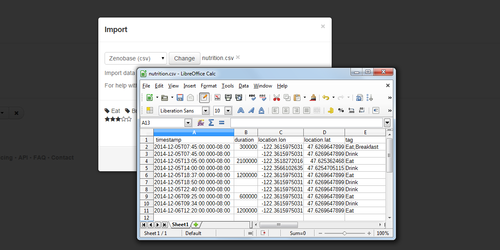
We now support importing custom data from spreadsheets in CSV format, in addition to JSON (which usually requires some scripting). Field names and all formatting is strict for now; to get an idea how a file is expected to look like, simply create a sample event and export it to a CSV file.
Hints
- The field separator is a comma.
- The first row contains the field names.
- Values with commas are quoted with double quotes, e.g.
"me, too". - Quotes can be escaped by doubling them up, e.g.
"so ""that's"" what you meant". - Fields with nested values are split into several columns, e.g.
location.lat,location.lon, orvolume.@value,volume.unit. - Multiple values in a single field are separated with semicolons, e.g.
foo;bar;baz. - Multiple nested values in single field are spread out over each column, e.g. 5dL and 1L are represented as
5;1,dL;L.
 If you have a spreadsheet that won’t import, or you’re not sure how to reformat it, we’re here to help.